
Guide · Outputs
How to get NDI, SRT, RTSP or HDMI out of an iPhone.
iPhone cameras don't speak NDI or SRT natively — and pretending otherwise is how setups get flaky. The working pattern: the phone sends one clean feed to a free Mac receiver, and the Mac does the distribution.

The honest layout
The phone runs Airlive Camera (free; iPhone 11+, iOS 17+) and streams over an open protocol to Airlive Bridge on your Mac (free, macOS 13+). Bridge takes whatever is on Program and republishes it to every output you switch on. The phone stays light — one feed, one job — and the Mac, which has the CPU and wired network for it, handles the fan-out.
Setup in three steps
- Install Bridge on the Mac and Airlive Camera on the phone (free on the App Store).
- Connect: Airlive Camera → Live → pick the Mac; the phone appears as a Bridge channel.
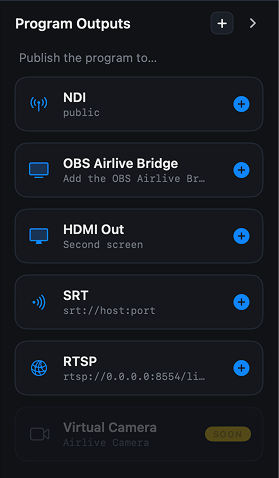
- CUT the channel to Program and enable outputs in the right rail.
What each output is for
- NDI®Local network
- SRTNetwork / WAN
- RTSPPull by URL
- HDMI / AirPlaySecond screen
NDI® — the program appears as a source on your network for any NDI-aware software or hardware to pick up. This is the "drop an iPhone into an existing production" path.
SRT — point it at whatever expects an SRT ingest: a hardware decoder, a streaming service, a remote studio across the internet.
RTSP — for tools that pull streams by URL: media servers, monitoring software, recorders.
HDMI / AirPlay — a clean program picture on a second screen: a projector, a venue TV, or a hardware switcher's HDMI input via an adapter.
And OBS gets its own path, which needs no plugin at all: Bridge publishes the program as a system camera called "Airlive Bridge Virtual Camera", so OBS takes it with a Video Capture Device source on the same Mac.
It is also the fastest of these paths to switch on. A compressed stream belongs to the camera that produced it, so every cut made the receiver resynchronise and the picture held for a moment. The virtual camera carries frames, which have nothing to resynchronise — the cut is instant, and the picture is not re-compressed on the way.
FAQ
Can the phone output NDI directly? No — and that's deliberate. Distribution is heavy, phones are battery-powered and wireless; the Mac does the heavy lifting while the phone just sends one clean feed. (That split is also part of the thermal story.)
Several outputs at once? Yes — every enabled output carries the program simultaneously.
Several cameras? That's the whole point of Bridge: a multicam multiview in front of these outputs, with the same fixed latency on every channel.